

Reporting Engine#
Juice makes it easy to generate beautiful, reproducible reports from your data using Python and Jinja templates.
1. Generate a Report in Python#
The fastest way to get started is to call make_report in a python console:
from orangeqs.juice.reporting import make_report

# This will generate a report with default settings and show a download link:
make_report()
2. Understanding how to customize your report#
Before we customize a report, we take a quick look at how juice finds and processes data.
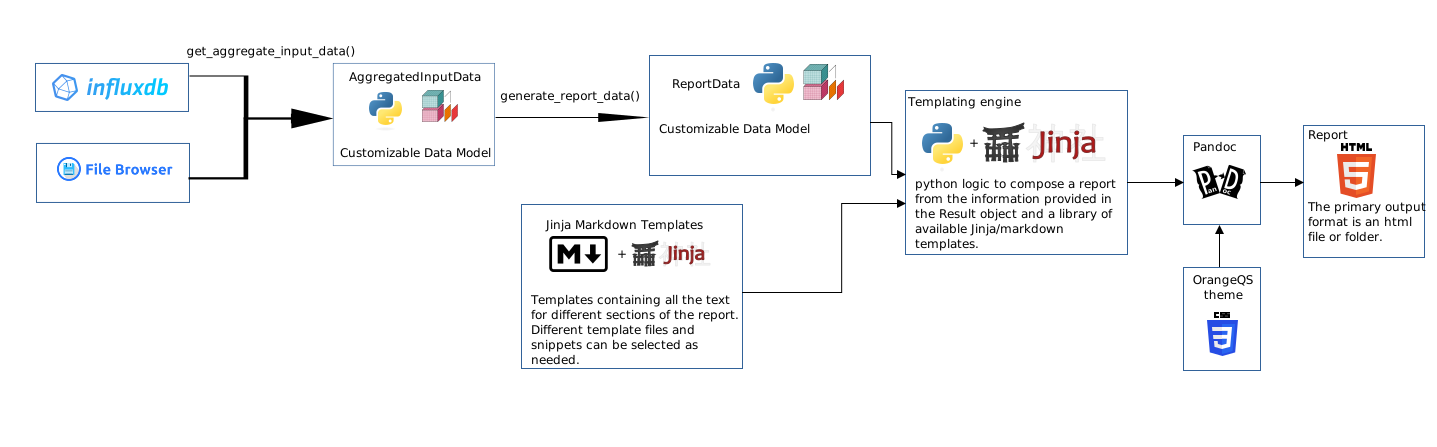
Juice uses a
get_aggregate_input_data()function to gather all the data from the system that needs to be included in the report.The output model of this function is then used in
generate_report_data()Finally, the output the
generate_report_data()is used in thetemplate.md.jinjato generate a report.
Juice allows you to inject custom data aggregation, processing functions and report templates via reporting-engine.toml. In the next sections, we’ll walk through how to do this.
3. Create data functions and a report template#
First, we create a reporting-engine.toml in your config folder.
Next, copy the contents of the following files from juice into your Lab repository.
orangeqs.juice.reporting.examples–>~/shared/lib/lab/src/lab/report_data_processing.pyorangeqs.juice.reporting.templates.custom_template.md.jinja–>~/shared/lib/lab/src/lab/templates/custom_template.md.jinja
Finally, point the contents of reporting-engine.toml to the files you just copied over. Verify this is correct by running
from orangeqs.juice.reporting import make_report

make_report()
Make sure that the output of the above now points to your copied over files!
4. Customize your report!#
Finally, you can now customize the data that is collected, the data processing and the report template to your needs!