

Alerting#
The alerting system is responsible for delivering actionable system events. It is intentionally not responsible for detecting conditions, only for handling and delivering alerts once triggered.
See the whole workflow in the diagram below:
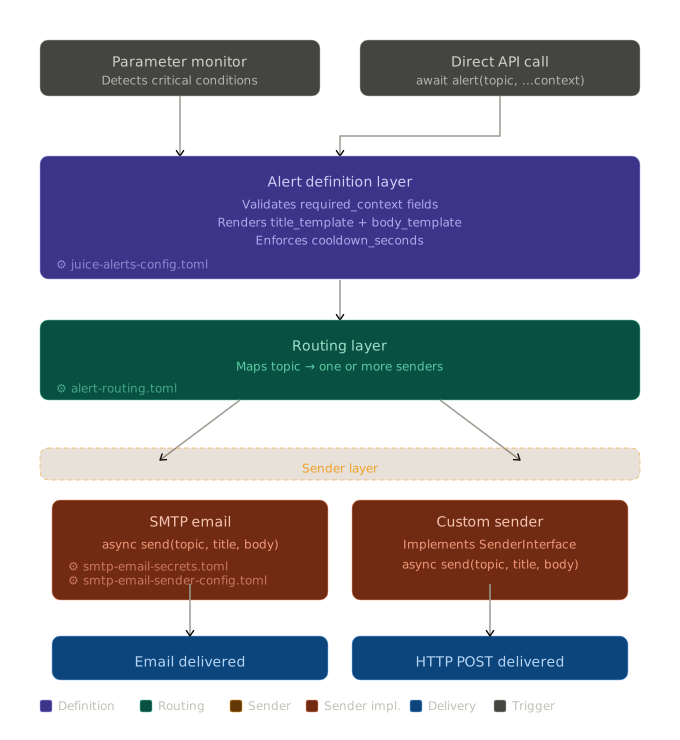
1. Alert Definition#
The Alert Definition section describes what an alert means. It provides the semantic definition of an alert, including how it should be presented and what contextual information is required to construct it.
An alert is identified by a topic, which serves as the link between the triggering system, the alert definition, and the routing configuration.
Responsibilities#
An alert definition establishes a consistent and reusable description of an alert. It defines the message content through templates and specifies the data required to render those templates correctly.
It also provides a contract between the triggering system (e.g., Parameter Monitor) and the alerting system by clearly defining what input data is required.
Alert Definition Model.#
[juice_alert_definition.fridge_overheating]
topic="fridge_overheating"
title_template="Fridge {fridge_name} Temerature is too high"
body_template="Fridge '{fridge_name}' is currently in an overheated state with current temperature {current_temperature} is above the allowed threshold temperature {threshold_temperature}."
required_context=["fridge_name", "current_temperature", "threshold_temperature"]
cooldown_seconds=0
The topic uniquely identifies the alert across the system. The title_template and body_template define how the alert is rendered into human-readable form. The required_context field specifies which variables must be provided at runtime in order to successfully render the templates. Lastly, cooldown_seconds is an optional parameter that ensures that once an alert is triggered, subsequent events for the same topic are suppressed for a defined duration.
Templates and Context#
Alert messages are constructed using templates that are rendered at runtime using a context object. The context is a dictionary of key-value pairs provided by the triggering system.
Each template may reference variables from the context. For example, a template might include placeholders such as {service_name} or {threshold}. At runtime, these placeholders are replaced with actual values.
Validation#
Validation ensures that:
All required context fields are present
Templates can be successfully rendered
The resulting message is complete
2. Alert Routing#
The Routing Layer is responsible for determining which delivery mechanisms should be used for each alert. It maps alert topics, as defined in the Alert Definition Layer, to one or more sender configurations.
Routing decisions are made at runtime based solely on the alert’s topic and the configured routing rules.
Responsibilities#
Alerts can be delivered through multiple channels simultaneously
Routing behavior is consistent and centrally configurable
Changes to delivery targets do not require changes to alert definitions or triggering systems
Routing Model#
[juice_alert_routing."fridge_overheating"]
senders=["smtp_email", "slack"]
Each topic maps to one or more SenderConfig objects to allow a single alert to be delivered through multiple senders, such as email, Mattermost or Slack, without duplicating alert definitions.
3. Sender Layer#
The Sender Layer is responsible for the actual delivery of alerts to external systems. It takes fully rendered alert messages and transmits them to their intended destinations using specific communication mechanisms such as email, HTTP APIs, or messaging platforms.
Responsibilities#
The layer is designed to be modular and extensible, allowing new delivery mechanisms to be added without affecting other parts of the system.
SMTP Configuration Split#
The SMTP sender uses two configuration models to separate secrets from operational settings.
SmtpSecretsConfig loads credentials from smtp-email-secrets.toml.
SmtpSenderConfig loads non-sensitive sender and routing settings from smtp-email-sender-config.toml.
This split allows system administrators to keep credentials in restricted config paths while allowing package-level sender behavior and receiver routing to be configured independently.
Sender Contract#
from typing import Protocol

class SenderInterface(Protocol):
    async def send(
        self,
        topic: str,
        title: str,
        body: str,
    ) -> None:
    """Delivers a fully rendered alert message to the specified receivers.

    Parameters
    ----------
    topic : str
        The unique identifier for the alert type (e.g., "fridge_overheating").
    title : str
	    A short, human-readable summary of the alert.
	body : str
		The complete alert message.

	Raises
	------
	Exception
		If the alert could not be delivered.
	"""
	...
Execution Semantics#
Senders are expected to be implemented using asynchronous I/O to ensure efficient handling of external communication. Each sender invocation is isolated.
The Sender Layer does not enforce retry logic globally. If retries are required, they may be implemented within individual sender implementations or handled by upstream systems.
Example: Custom HTTP Sender#
import httpx
import logging

from orangeqs.juice.settings import Configurable

_logger = logging.getLogger(__name__)

class CustomSender(SenderInterface):
    def __init__(self, config: Config):
        """Arbitrary initialization logic for the sender, such as setting up authentication or preparing resources."""
        self.config = config

    async def send(self, topic: str, title: str, body: str) -> None:
        _logger.info(f"Sending alert {title}: {body}")

        async with httpx.AsyncClient(timeout=5.0) as client:
            response = await client.post(
                self.config.url,
                json={
                    "topic": topic,
                    "title": title,
                    "body": body,
                },
                headers={
                    "Authorization": f"Bearer {self.config.token}",
                    "Content-Type": "application/json",
                },
            )

        if response.status_code != 200:
            raise Exception(f"Failed to send alert: {response.text}")
4. API#
The alert function is the primary entry point into the alerting system. It provides a single, unified interface for emitting alerts while encapsulating the entire lifecycle of an alert.
This function is intentionally designed to be simple from the caller’s perspective, while delegating all complexity to the underlying system layers. See alert() for more details.
The function is asynchronous to support non-blocking execution of sender operations and to allow multiple delivery mechanisms to run concurrently.
SMTP Email Integration#
This section describes how to configure the system to send alerts through an SMTP server in a production environment.
Prerequisites#
Before configuring the SMTP sender, you need SMTP credentials and an SMTP host that allows sending from your configured mailbox.
The following values are required:
A valid SMTP username
A valid SMTP password
An SMTP host and port
A mailbox that is allowed to send alert emails
Configuration#
To enable email delivery for a specific alert, the SMTP sender must be included in the Routing Layer configuration for the desired topic.
alert-routing.toml:
[juice_alert_routing."fridge_overheating"]
senders=["smtp_email"]
For secrets, keep credentials in /etc/juice/config/smtp-email-secrets.toml because this path should only be accessible by system administrators.
smtp-email-secrets.toml:
username="smtp-username"
password="smtp-password"
Next, define sender details and receivers.
smtp-email-sender-config.toml:
sender_email="[email protected]"
default_receivers=["[email protected]"]
host="smtp.mailersend.net"
port=587
use_ssl=false
use_starttls=true

[topic_receivers]
fridge_overheating=["[email protected]"]
In this example, alerts for the fridge_overheating topic are sent through SMTP email to both the default receivers and the topic-specific receivers.
To test alert delivery, set up alert definition, alert routing and then invoke the alert API:
from orangeqs.juice.alerting import alert

await alert("fridge_overheating", fridge_name="fridge_2K", current_temperature="4.7 K", threshold_temperature="2 K")
Troubleshooting#
Misconfiguration of SMTP integration usually results in connection or authentication errors.
An incorrect username, password, host, or port can cause authentication or connection failure.
If use_ssl and use_starttls are incorrectly configured for the server, delivery can fail during handshake.
If the sender email does not correspond to a valid mailbox for the SMTP account, delivery can fail at send time.
Parameter Monitor Integration#
The Alerting system is closely integrated with the Parameter Monitor, which is responsible for detecting when monitored signals enter critical states. The Parameter Monitor acts as the triggering layer, while the Alerting system is responsible for rendering, routing, and delivering the resulting alerts.
Prerequisites#
Email Integration must be configured to enable alert delivery via SMTP email.
Enabling Alerts#
By default, Parameter Monitor does not emit alerts. To enable alerting for a monitored topic, the alert flag must be set to true in the corresponding monitoring configuration.
parameter-monitor.toml:
[juice_topic_monitoring_units.mc_temperature]
display_label = "MC Temperature"
monitored_topic = "system-monitor.thermometry_unit_1.thermometer_5"
monitored_event_type = "orangeqs.juice.system_monitor.data_structures.TemperaturePoint"
monitored_field = "temperature"
unit = "kelvin"
warn_if_larger = 20.0e-3
throttle_if_larger = 25.0e-3
throttle_grace_interval = 10.0
stop_throttle_if_smaller = 20.0e-3
stop_throttle_grace_interval = 5.0
alert = true
When alert = true, the Parameter Monitor will emit an alert event whenever the monitored condition transitions into a critical state.
If no additional configuration is provided, a default alert definition is used, see get_alert_description_from_parameter_monitor().
The default alert behavior can be overridden by defining an explicit alert definition in alert-definition-config.toml.
[juice_alert_definitions.mc_temperature]
topic="mc_temperature"
title_template="{display_label} is too high"
body_template="{display_label} is currently in an overheated state with current temperature {current_value} is above the allowed threshold temperature {throttle_if_larger}."
required_context=["display_label", "unit", "throttle_if_larger", "current_value"]
cooldown_seconds=0
This configuration replaces the default rendering logic for the given topic while preserving the triggering behavior defined in the Parameter Monitor.
To replace the sender for a topic simply edit alert-routing.toml with the desired sender”
alert-routing.toml:
[juice_alert_routing."fridge_overheating"]
senders=["slack"] # Note: sender availability depends on configured sender implementations
Provided Context#
When Parameter Monitor triggers an alert, it automatically provides a predefined set of context fields to the Alerting system. These values are guaranteed to be available and can be used in alert templates.
The following context keys are always included:
topic
display_label
unit
monitored_topic
monitored_event_type
monitored_field
throttle_if_larger
throttle_grace_interval
stop_throttle_if_smaller
stop_throttle_grace_interval
current_value
For more detailed explanation please refer to the class definition at JuiceTopicMonitorConfig.